← Home
Bitcoin Journey · Full Guide
Know what to buy every week. Know when to step aside.
Phoenix Macro
·
November 2026
·
$4.99 / month
Bitcoin Journey now runs on Phoenix 2.0. Every week it tells you how much Bitcoin to buy. Once per cycle it tells you to take part of your stack off the table, and later it tells you when to buy it back. You log what you did; Bitcoin Journey keeps the score.
What Bitcoin Journey does for you
Most people buy Bitcoin the same way every week and hope for the best. That works, but it buys just as much at the top of a cycle as at the bottom. Bitcoin Journey adds the missing judgement: it reads the market each week and turns it into one clear instruction for your budget.
A weekly buy, sized for you
Set your monthly budget once. Each week you see exactly how much to buy, in dollars and in BTC. Quieter weeks keep some budget back for cheaper ones.
One sell per cycle
When the cycle turns, Bitcoin Journey tells you to sell a share of your stack. Most weeks, and most years, it simply says: no sell this week.
Buy it back cheaper
The money from that sell becomes your cycle reserve. Bitcoin Journey tells you when to put it back into Bitcoin, so you end the cycle with more coins.
Your stack, always current
Cost basis, sats, profit and loss, your Fortress stage and your Freedom Number, all from the buys and sells you log.
How to use it, step by step
1 · Set your budget and profile
Open the Allocator. Enter the amount you want to put into Bitcoin each month, choose your profile and press SAVE. You can change both at any time.
2 · Check this week’s buy
Each week the Terminal and the Allocator show This Week’s Buy: the amount in dollars and the BTC it buys at today’s price.
3 · Buy on your exchange, then log it
Buy on the exchange you already use. Then tap + ADD TRANSACTION and enter what you spent, the BTC you received and the price. Bitcoin Journey never connects to your exchange; you stay in control of your coins.
4 · When a sell signal appears
Once per cycle the Allocator shows a sell signal with the exact BTC to sell. Sell on your exchange, then tap LOG SELL. The money becomes your cycle reserve. You can also choose to skip it.
5 · Buy back when it tells you
While you hold a cycle reserve, the weekly buy includes the amount to put back into Bitcoin. Keep buying and logging as usual; the reserve runs down on its own.
6 · Watch your journey
Your Fortress stage, your Freedom Number and your full transaction history update with every entry. Five minutes a week is all it takes.
Choose your profile
Your profile decides how much of your stack is sold when the cycle turns. Everything else works the same way.
Conservative — sells 75%
The most protection. Takes most of the stack off the table at a cycle exit and buys it back later.
Balanced — sells 50%
The middle way. Half of the stack is sold at a cycle exit, half stays invested the whole time.
Alpha — sells 25%
Stays the most invested. Only a quarter of the stack is sold at a cycle exit.
Not sure?
Start with Balanced. You can switch profiles at any time in the Allocator.
Every screen, explained
The screenshots below use an example account: $700 a month, Balanced profile.
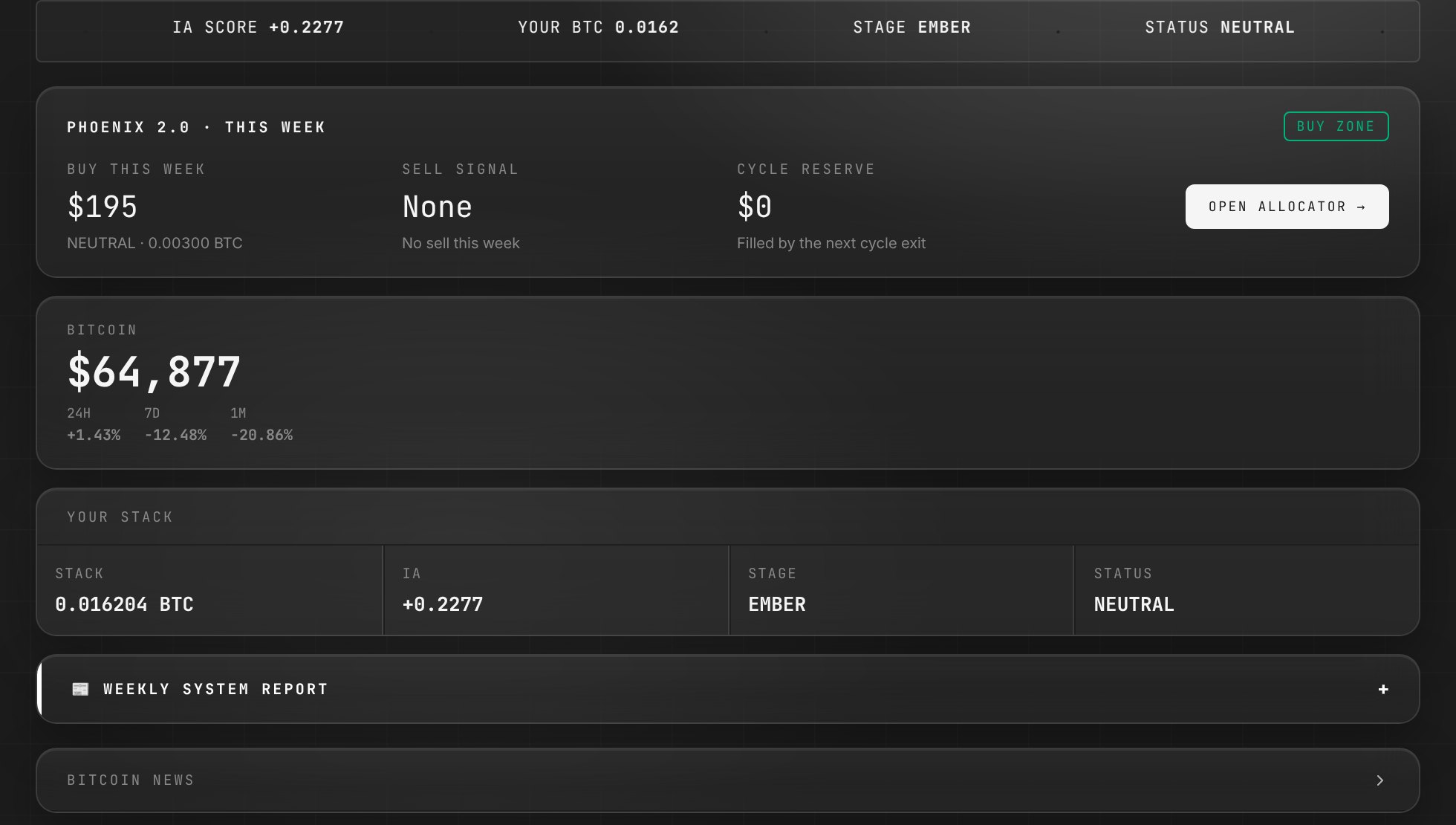
Terminal
Your first screen. Live Bitcoin price, this week’s buy, any sell signal and your cycle reserve at a glance, with your stack and a Bitcoin news feed below.
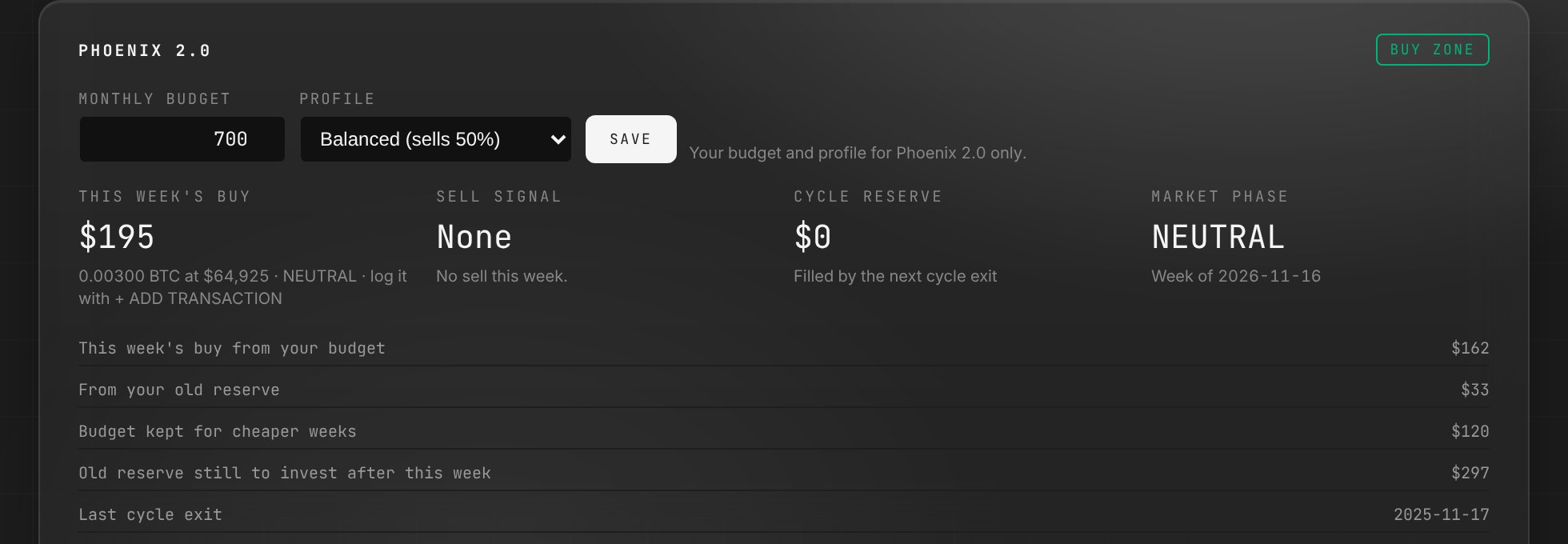
Allocator
Where you act. Set your budget and profile, see this week’s buy, log a sell when one comes, and track your cycle reserve. Below it: your stack, cost basis, stack growth chart and live market data.
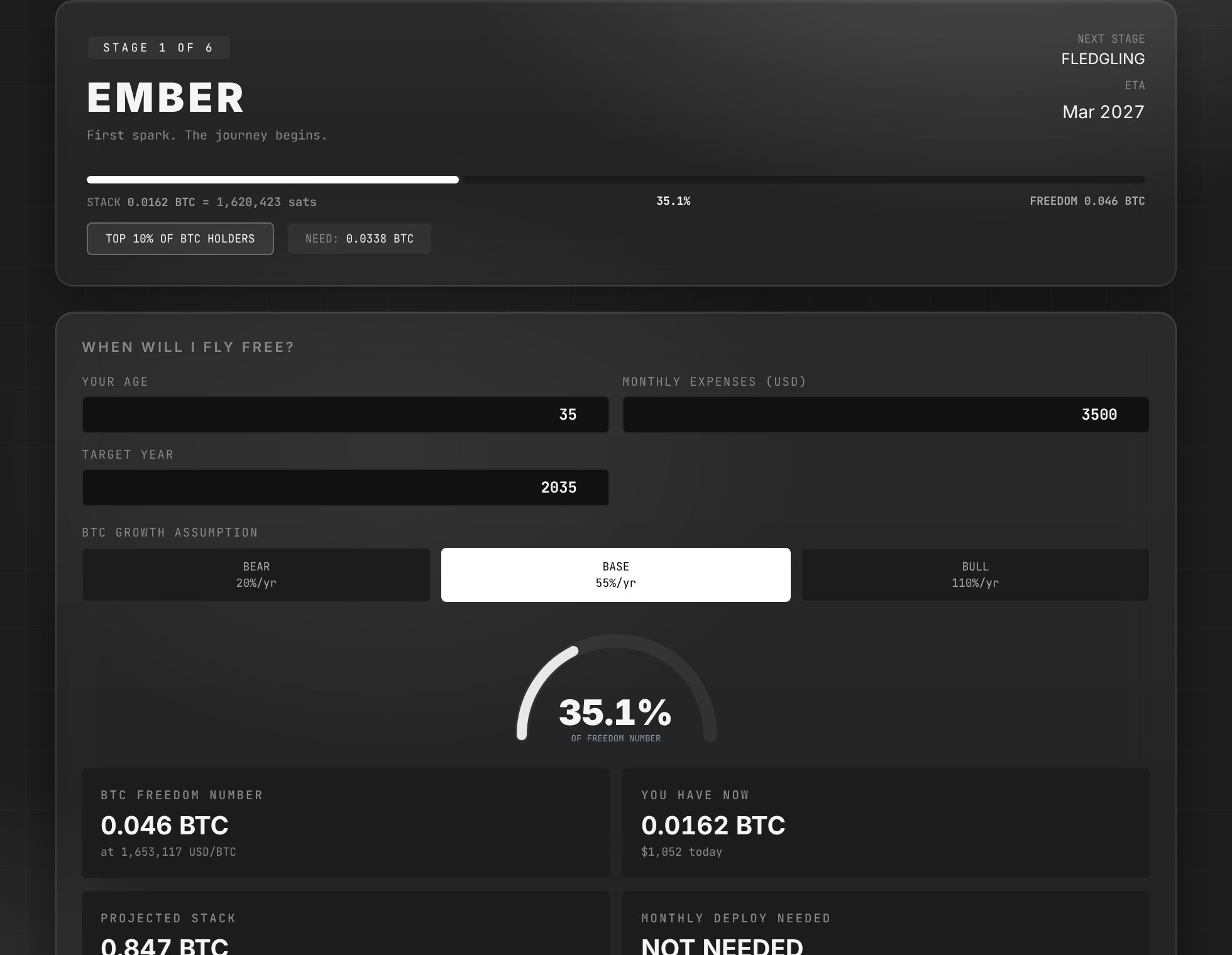
Fortress
Your path through six stages, from EMBER to PHOENIX. See your current stage, how far you are from the next one and when you are likely to reach it, and your Freedom Number: the Bitcoin you need to cover your expenses by your target year.
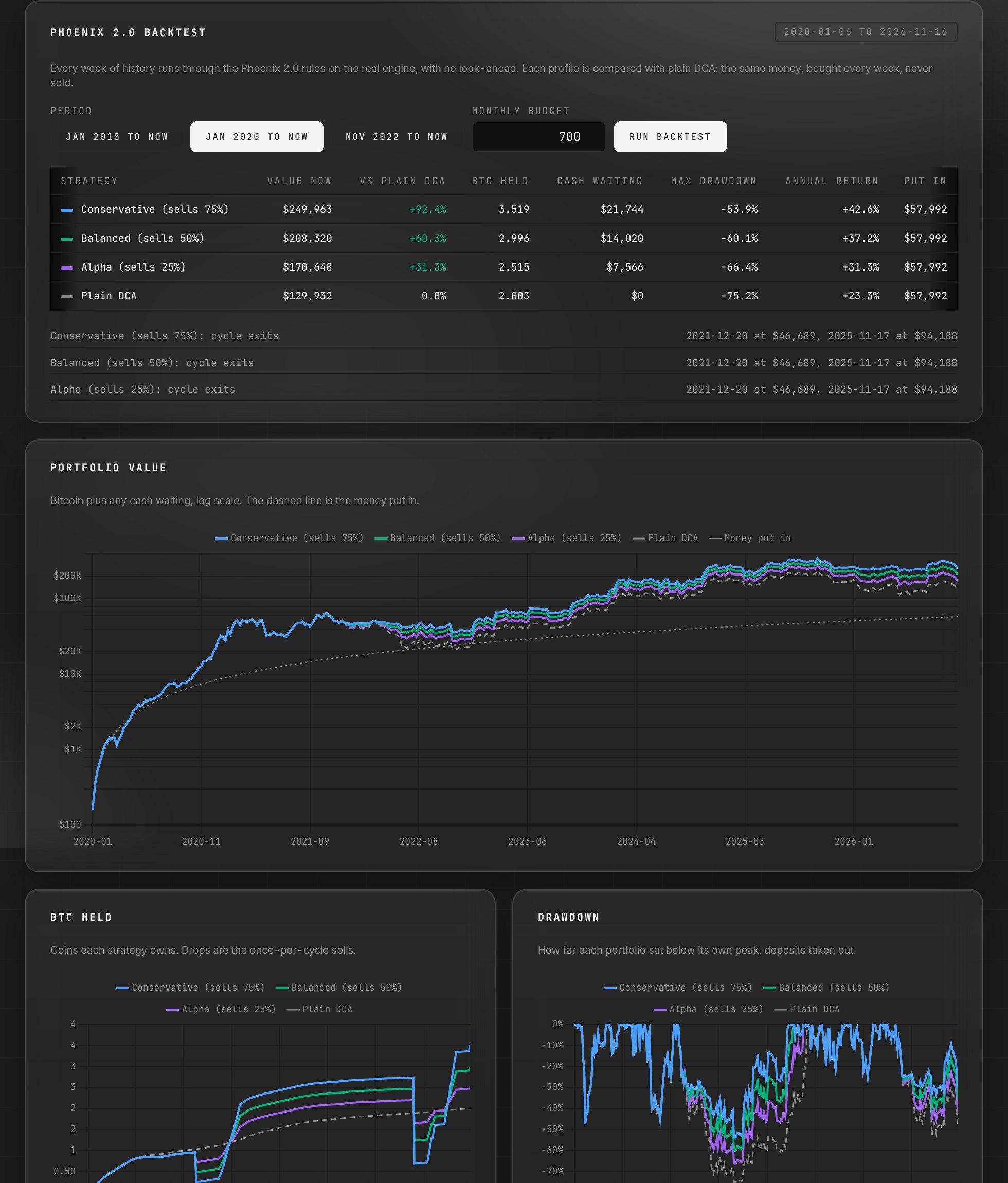
Backtest
See how the three profiles would have done against plain DCA on past market data, with your own monthly budget.
Historical
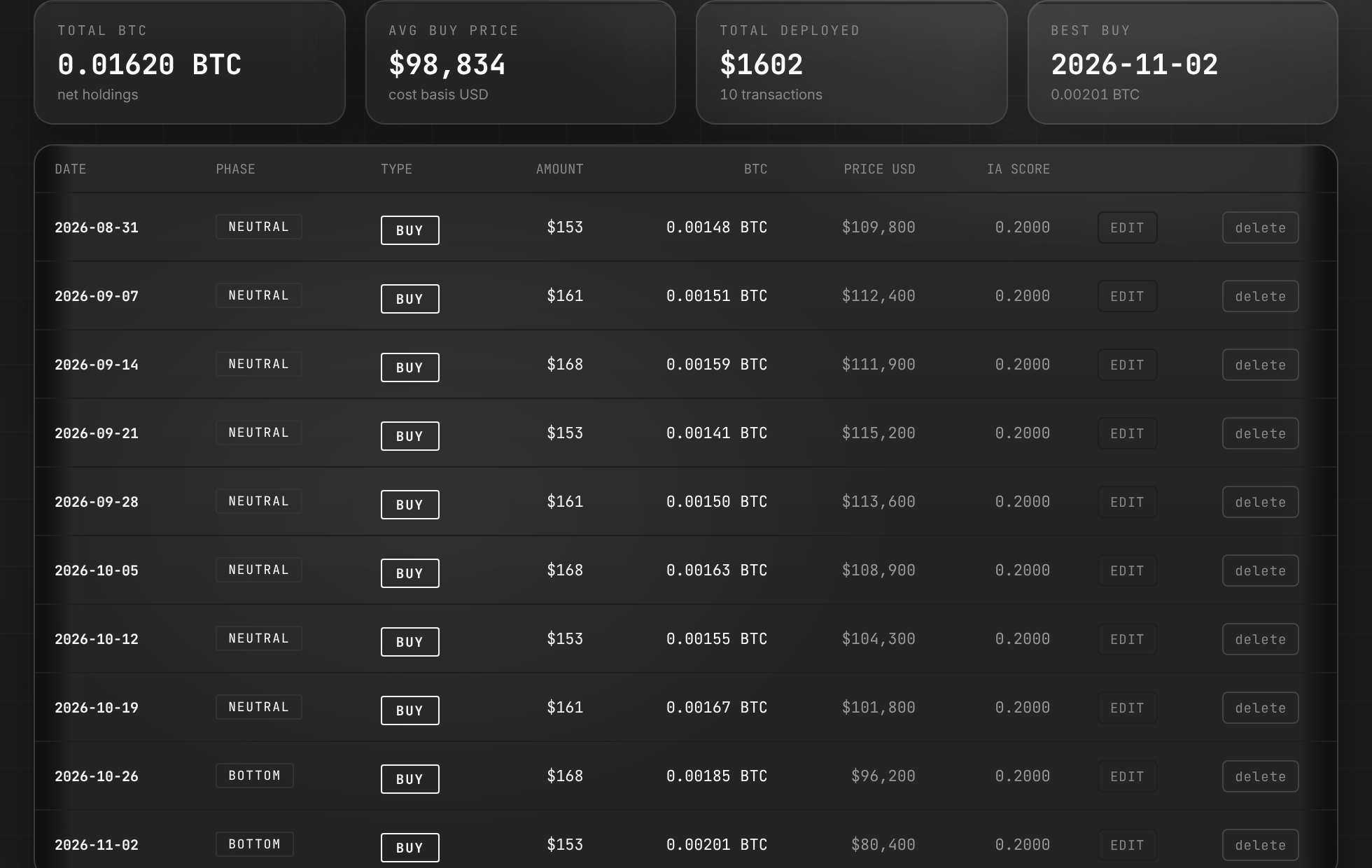
Every buy and sell you have logged, with date, amount, BTC and price. Edit an entry if you made a typo.
Journey AI
An assistant that knows your stack, your stage and the current market phase. Ask it anything about your accumulation, in your own language.
Three profiles against plain DCA
The same money, put in every week since January 2020.
The six stages of your journey
Bitcoin Journey maps your accumulation through six named milestones. Each one is a meaningful BTC threshold, and as you cross each stage your position among global Bitcoin holders improves.
EMBER — 0.01 BTC
First spark. The journey begins.
FLEDGLING — 0.05 BTC
Wings forming. Consistent accumulation is building the base.
RISING — 0.10 BTC
Gaining altitude. Your stack is becoming meaningful in global terms.
SOARING — 0.25 BTC
Above most. A quarter Bitcoin is rare among all holders.
SOVEREIGN — 1.00 BTC
One full Bitcoin. Not everyone on earth can ever reach this.
PHOENIX — 3.00 BTC
The apex. A generational holding.
START YOUR BITCOIN JOURNEY
$4.99/mo or $49/year. 4 weeks free, no card needed.
Bitcoin Journey is a Bitcoin accumulation tool. It does not provide financial advice. Results shown are simulated on past market data; nothing here promises the same returns, and the market can play out a different scenario. Bitcoin is a volatile asset. Only invest what you can afford to hold through large drawdowns.